
In Version 0.55, we added the ability for players to have multiple Game Profiles on a single Invokers game Account. This means players can run separate player profiles, like a free-to-play profile alongside their regular profile.
Each Game Profile is effectively an entirely independent Invokers profile, with its own collection, progress, and purchases.
IMPORTANT! As your player and spending behavior may differ between Game Profiles, you may see different offers in the in-game Shop across different Game Profiles.
All of these profiles sit within your main Account. An Invokers Account can support up to 3 individual Game Profiles. The ability to make Game Profiles is only available when you are connected to the Internet.
When selecting the Game Profile you wish to play, you will be shown:
The profile’s nickname
The profile’s Avatar
The Player Level you’ve reached on that profile
When you last logged into that profile
To manage and switch between Game Profiles, head to Settings and go to the Profiles tab.
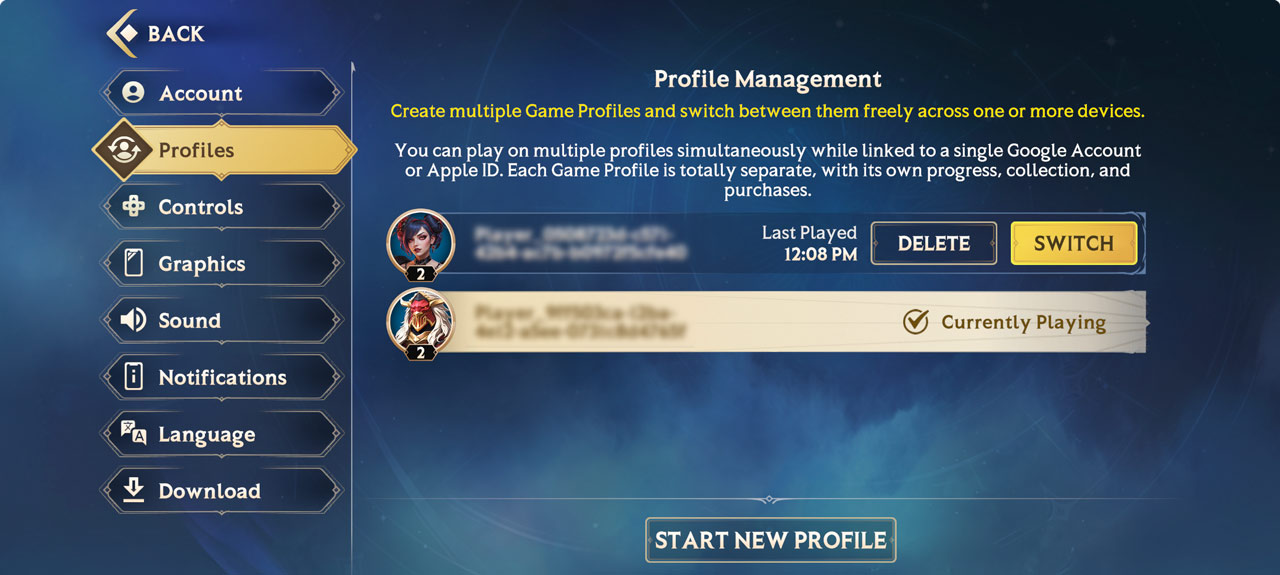
You can only create 3 Game Profiles a week, and you can only have 3 Game Profiles active on your account at once.
Should you log into your account on a different device, you will automatically start playing on the most recently active Game Profile.
When you start a new Game Profile, you will have to play through the tutorial before you can switch to another profile.
Certain actions, like account bans, will apply to all Game Profiles tied to an Account.
Should you wish to delete an individual Game Profile, hit "Delete".
You will then be prompted to confirm your decision. All progress and purchases tied to that Game Profile will be lost if you choose to delete it. Other Game Profiles tied to your account will not be affected.
